How to run code analyses using Docker
Overview
Are you regularly using Docker and would you like to run the CAST Imaging Analyzer in a Docker container? Look no further, because this is possible! CAST provides the analyzer tool as an image on Docker Hub that is regularly updated.
How does it work?
The containerized CAST Imaging Analyzer is run direct from the command line on your machine and results are uploaded to CAST Imaging Express automatically. Docker Engine runs on Microsoft Windows, macOS and Linux.
The command is tailored to your organization, so always copy it from CAST Imaging Express rather than typing it: click Start analysis, select the Docker tab and copy the command from the Docker Setup box. Then replace the placeholders in square brackets with your own values:
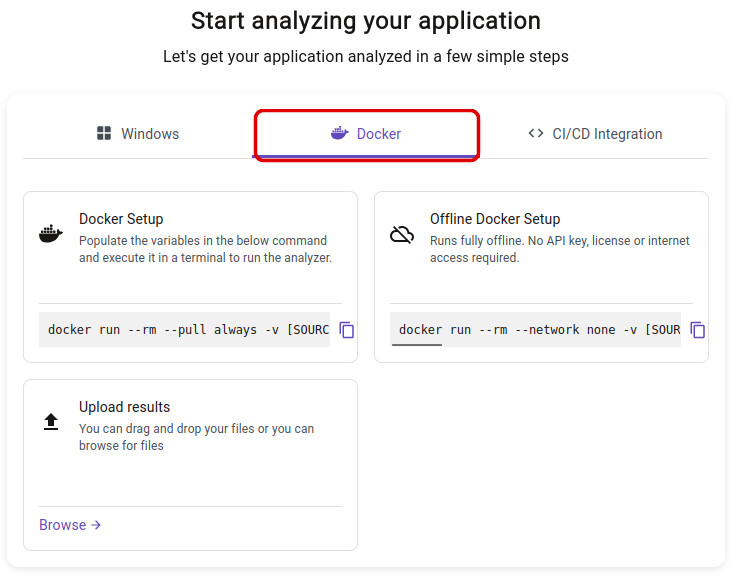
This analyzer requires internet access and an API key. To analyze source code on a machine without internet access, or without an API key, use the Offline Docker Analyzer instead.
The copied command has the following form:
docker run --rm --pull always -v [SOURCE_CODE_PATH]:/home/carl/extras/source -v [CACHE_PATH]:/home/carl/extras/extensions -v [RESULT_PATH]:/home/carl/extras/results castimaging/imaging-docker-analyzer:latest -ak [API_KEY] -n [APP_NAME] -t [TENANT]
Where:
[SOURCE_CODE_PATH]- is the path to the local folder containing your source code[CACHE_PATH]- is the path to a local folder where extensions will be downloaded and cached[RESULT_PATH]- is the path to a local folder where a copy of the results and the log file are written, in a date stamped folder (UTC) per analysis:[RESULT_PATH]/[APP_NAME]/<yyyymmdd-hhmmss>/[API_KEY]- is your CAST Imaging Express API key - see Generate and use an API key[APP_NAME]- is your Application Name[TENANT]- identifies your organization’s tenant in CAST Imaging Express, so that the results are uploaded to your organization. The command copied from Start analysis already contains the correct value: do not change it
Note that:
--pull always- usingalwayswill ensure that the image is always updated to the latest version before the analysis is run (recommended)--rmwill automatically delete the container when the analysis is complete, remove this parameter if you want to access the container after the analysis is complete.
For example:
docker run --rm --pull always -v /home/CAST/app1:/home/carl/extras/source -v /home/CAST/extensions:/home/carl/extras/extensions -v /home/CAST/results:/home/carl/extras/results castimaging/imaging-docker-analyzer:latest -ak NG8pzC3I.6R8EI5vBR3qaNZO -n APP1 -t mycompany